





Office Desk
FILTER BY COLOR


Filter by brand


Arete Laptop Stand – Black
- Crafted from durable powder-coated aluminium and smooth leatherite for long-lasting matte finish and scratch-resistance.
- Deliberately clean, slender and free-flowing structure lends it a unique lightness despite being fashioned from strong Aluminium metal.
- Designed elegantly to be equally attractive from the front as well as back making it ideal for all kinds of desk setups.
- The bottom retaining edge with leatherite cladding lends optimal support to hold your laptop firmly in place and avoid scratches.
- The ideal elevation angle offers comfortable strain-free viewing as you facetime, work or binge watch your favourite TV shows.
- Implementation of rounded edges to maintain visual continuity and meet ergonomic functions.
- Scratch-resistant eva foam on the base resists skidding and adds stability.

Arete Laptop Stand – Blue
- Crafted from durable powder-coated aluminium and smooth leatherite for long-lasting matte finish and scratch-resistance.
- Deliberately clean, slender and free-flowing structure lends it a unique lightness despite being fashioned from strong Aluminium metal.
- Designed elegantly to be equally attractive from the front as well as back making it ideal for all kinds of desk setups.
- The bottom retaining edge with leatherite cladding lends optimal support to hold your laptop firmly in place and avoid scratches.
- The ideal elevation angle offers comfortable strain-free viewing as you facetime, work or binge watch your favourite TV shows.
- Implementation of rounded edges to maintain visual continuity and meet ergonomic functions.
- Scratch-resistant eva foam on the base resists skidding and adds stability.

Arete Laptop Stand – Green
- Crafted from durable powder-coated aluminium and smooth leatherite for long-lasting matte finish and scratch-resistance.
- Deliberately clean, slender and free-flowing structure lends it a unique lightness despite being fashioned from strong Aluminium metal.
- Designed elegantly to be equally attractive from the front as well as back making it ideal for all kinds of desk setups.
- The bottom retaining edge with leatherite cladding lends optimal support to hold your laptop firmly in place and avoid scratches.
- The ideal elevation angle offers comfortable strain-free viewing as you facetime, work or binge watch your favourite TV shows.
- Implementation of rounded edges to maintain visual continuity and meet ergonomic functions.
- Scratch-resistant eva foam on the base resists skidding and adds stability.

Arete Laptop Stand – Ivory White
- Crafted from durable powder-coated aluminium and smooth leatherite for long-lasting matte finish and scratch-resistance.
- Deliberately clean, slender and free-flowing structure lends it a unique lightness despite being fashioned from strong Aluminium metal.
- Designed elegantly to be equally attractive from the front as well as back making it ideal for all kinds of desk setups.
- The bottom retaining edge with leatherite cladding lends optimal support to hold your laptop firmly in place and avoid scratches.
- The ideal elevation angle offers comfortable strain-free viewing as you facetime, work or binge watch your favourite TV shows.
- Implementation of rounded edges to maintain visual continuity and meet ergonomic functions.
- Scratch-resistant eva foam on the base resists skidding and adds stability.

Arete Laptop Stand – Red
- Crafted from durable powder-coated aluminium and smooth leatherite for long-lasting matte finish and scratch-resistance.
- Deliberately clean, slender and free-flowing structure lends it a unique lightness despite being fashioned from strong Aluminium metal.
- Designed elegantly to be equally attractive from the front as well as back making it ideal for all kinds of desk setups.
- The bottom retaining edge with leatherite cladding lends optimal support to hold your laptop firmly in place and avoid scratches.
- The ideal elevation angle offers comfortable strain-free viewing as you facetime, work or binge watch your favourite TV shows.
- Implementation of rounded edges to maintain visual continuity and meet ergonomic functions.
- Scratch-resistant eva foam on the base resists skidding and adds stability.
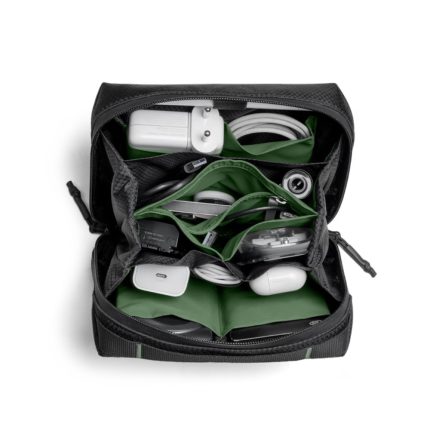
Black Ripstop Vault Tech Organiser – Medium
- Crafted from extremely durable, lightweight and water-resistant Ripstop material
- Main zip closure opens wide for easy access
- Features multiple pockets to hold laptop charger, mouse, powerbank, cables, pendrive among others
- A zip pocket in the centre for safe storage of valuables like SIM card, flash drive etc.
- Either side of the compartment features one full sized compartment and two slip pockets.
- Pen/stylus loop on one side and three elasticated panels on the other for earphones, cables, etc.
- Contrast inner lining lets you find everything you need, in a snap
- Top handle for easy grab and go
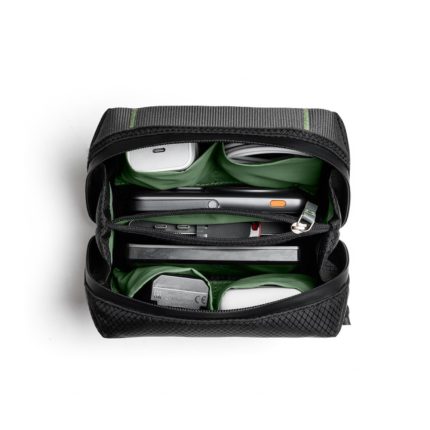
Black Ripstop Vault Tech Organiser – Small
- Crafted from extremely durable, lightweight and water-resistant Ripstop material
- Main zip closure opens wide for easy access
- Features multiple pockets to hold laptop charger, mouse, powerbank, earbuds, cables, pendrive among others
- A zip pocket in the centre for safe storage of valuables like SIM card, flash drive etc.
- Either side of the compartment features one full sized compartment and two slip pockets.
- Contrast inner lining lets you find everything you need, in a snap
- Top handle for easy grab and go

Blue Ripstop Vault Tech Organiser – Medium
- Crafted from extremely durable, lightweight and water-resistant Ripstop material
- Main zip closure opens wide for easy access
- Features multiple pockets to hold laptop charger, mouse, powerbank, cables, pendrive among others
- A zip pocket in the centre for safe storage of valuables like SIM card, flash drive, etc.
- Either side of the compartment features one full sized compartment and two slip pockets.
- Pen/stylus loop on one side and three elasticated panels on the other for earphones, cables, etc.
- Contrast inner lining lets you find everything you need, in a snap
- Top handle for easy grab and go

Blue Ripstop Vault Tech Organiser – Small
- Crafted from extremely durable, lightweight and water-resistant Ripstop material
- Main zip closure opens wide for easy access
- Features multiple pockets to hold laptop charger, mouse, powerbank, cables, pendrive among others
- A zip pocket in the centre for safe storage of valuables like SIM card, flash drive, etc.
- Either side of the compartment features one full sized compartment and two slip pockets.
- Pen/stylus loop on one side and three elasticated panels on the other for earphones, cables, etc.
- Contrast inner lining lets you find everything you need, in a snap
- Top handle for easy grab and go

Cirque Phone and Pen Stand – Black
- Crafted from durable, powder-coated aluminium and wax-polished natural ashwood for scratch-resistant and long-lasting matte finish.
- Takes up little space on your desk and makes it easy to keep the desk organised.
- Precisely carved cylindrical wooden pen stand to store your stationery.
- Ergonomically positioned ashwood panel to keep the phone in place.
- Hollow space at the bottom of phone holder for easy access to charging port.
- Implementation of rounded edges to maintain visual continuity and meet ergonomic functions.
- Scratch-resistant eva foam pad at the bottom for added stability.

Cirque Phone and Pen Stand – Blue
- Crafted from durable, powder-coated aluminium and wax-polished natural ashwood for scratch-resistant and long-lasting matte finish.
- Takes up little space on your desk and makes it easy to keep the desk organised.
- Precisely carved cylindrical wooden pen stand to store your stationery.
- Ergonomically positioned ashwood panel to keep the phone in place.
- Hollow space at the bottom of phone holder for easy access to charging port.
- Implementation of rounded edges to maintain visual continuity and meet ergonomic functions.
- Scratch-resistant eva foam pad at the bottom for added stability.

Cirque Phone and Pen Stand – Green
- Crafted from durable, powder-coated aluminium and wax-polished natural ashwood for scratch-resistant and long-lasting matte finish.
- Takes up little space on your desk and makes it easy to keep the desk organised.
- Precisely carved cylindrical wooden pen stand to store your stationery.
- Ergonomically positioned ashwood panel to keep the phone in place.
- Hollow space at the bottom of phone holder for easy access to charging port.
- Implementation of rounded edges to maintain visual continuity and meet ergonomic functions.
- Scratch-resistant eva foam pad at the bottom for added stability.

Cirque Phone and Pen Stand – Ivory White
- Crafted from durable, powder-coated aluminium and wax-polished natural ashwood for scratch-resistant and long-lasting matte finish.
- Takes up little space on your desk and makes it easy to keep the desk organised.
- Precisely carved cylindrical wooden pen stand to store your stationery.
- Ergonomically positioned ashwood panel to keep the phone in place.
- Hollow space at the bottom of phone holder for easy access to charging port.
- Implementation of rounded edges to maintain visual continuity and meet ergonomic functions.
- Scratch-resistant eva foam pad at the bottom for added stability.

Cirque Phone and Pen Stand – Red
- Crafted from durable, powder-coated aluminium and wax-polished natural ashwood for scratch-resistant and long-lasting matte finish.
- Takes up little space on your desk and makes it easy to keep the desk organised.
- Precisely carved cylindrical wooden pen stand to store your stationery.
- Ergonomically positioned ashwood panel to keep the phone in place.
- Hollow space at the bottom of phone holder for easy access to charging port.
- Implementation of rounded edges to maintain visual continuity and meet ergonomic functions.
- Scratch-resistant eva foam pad at the bottom for added stability.
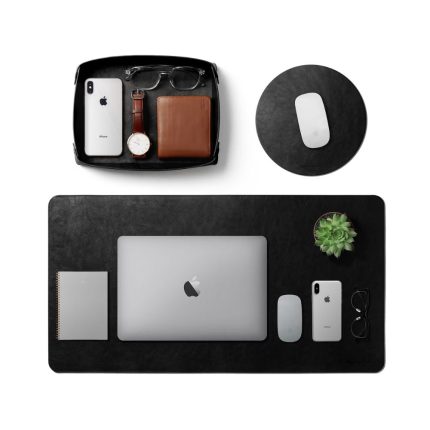
Desk Trio Bundle – Limited Edition (Black)
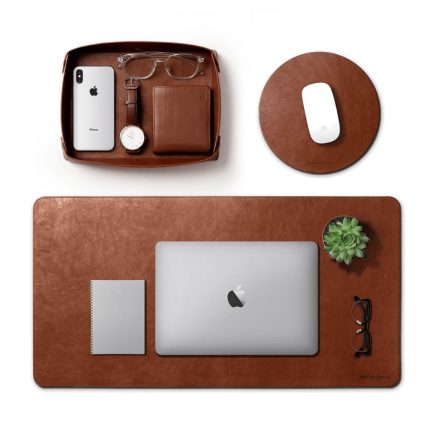
Desk Trio Bundle – Limited Edition (Tan)
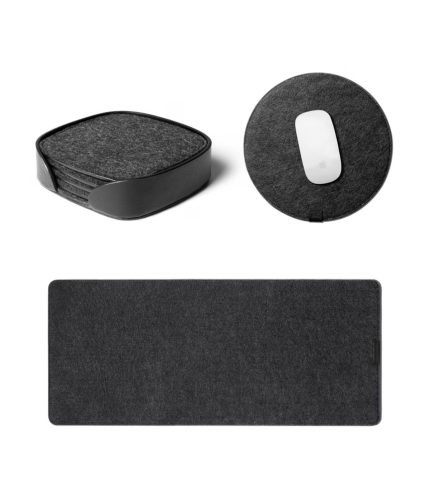
Felt Desk Trio Bundle – Limited Edition (Black)
- Handcrafted in India with fine quality felt and vegan leather.
- Reversible design that can be used as a wholly Vegan leather mat on one side and wholly Felt mat on the other.
- Waterproof and can be easily cleaned with a cloth.
- Protects all your desk essentials and keeps your desk scratch free.
- Seamless smooth finish prevents fraying.

Felt Desk Trio Bundle – Limited Edition (Blue)
- Handcrafted in India with fine quality felt and vegan leather.
- Reversible design that can be used as a wholly Vegan leather mat on one side and wholly Felt mat on the other.
- Waterproof and can be easily cleaned with a cloth.
- Protects all your desk essentials and keeps your desk scratch free.
- Seamless smooth finish prevents fraying.
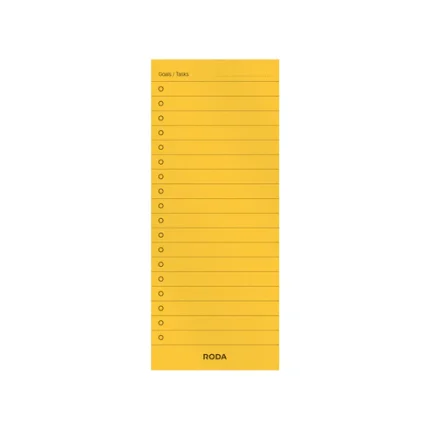
Habit Tracker (12 Cards)

Marshal Mini Tech Kit Organiser – Blue
- Compact, cotton-canvas, kit stores essential tech accessories.
- Flat-layout when zipped down for convenient access and stashing.
- Elastic loops on one side stitched to hold cables of all sorts, firmly.
- Aptly sized, organic cotton pocket fit charging bricks, power banks, wireless mouse, and miscellaneous adaptors.
- Eva-foam sheet affixed to hoard, memory cards, pen-drives, etc.
- Slim design, soft outer body, and flexible eva-foam lining enable it to squeeze into tense spaces and fits easily in hands.
Most desk problems are posture problems. A screen that sits too low pulls the neck forward, a laptop flat on the desk forces the wrists up, and cables across the surface make the whole thing feel temporary. This category covers the hardware that fixes those three things — laptop stands, monitor risers, phone and pen stands, desk mats, trays and cable management — for a home office or a shared workspace.
What KlippiK sells in Office Desk
There are 80 products in Office Desk on klippik.com, priced from KWD 1.000 to KWD 38.000. The range is by DailyObjects and Roda. 32 of them are in stock for immediate dispatch; the rest are made to order and ship in five to seven business days. The best sellers right now are Desk Trio Bundle – Limited Edition (Black), Turf 2.0 Felt Desk Mat With Mouse Pad – (Gray) and Turf 2.0 Felt Desk Mat With Mouse Pad – (Green).
Colours currently in the range include Black, Red, Tan, Blue, Green and Ivory White.
Sizes available: Large, Mini, Medium, 210×140mm paper size., 12 (H) x 17 (W) x 7.5 (D) cm and Small.
Set the desk up in the right order
- Raise the screen first. The top of the display should sit at or just below eye level, so your head stays balanced over your shoulders instead of tipping forward. A laptop stand or monitor riser does this in one move.
- Then fix the hands. Once the laptop is raised you need an external keyboard and mouse, because the built-in keyboard is now too high.
- Then the surface. A desk mat gives the mouse a consistent tracking surface, stops a hard desk marking your wrists, and visually defines the working area.
- Then the clutter. A phone stand, a pen stand and a small tray take the three things you pick up most out of the way of the keyboard.
- Cables last. Clip them to the back edge so a charger does not fall to the floor every time you unplug it.
What each piece actually does
- Laptop stand — lifts the screen to eye level and lets air circulate under the machine, which keeps it cooler and quieter under load.
- Monitor stand or riser — raises an external display and returns the space underneath for a keyboard or a notebook.
- Desk mat — a consistent mousing surface, protection for the desk, and a softer edge under the forearms.
- Phone stand — keeps the phone visible and charging without lying face-up under your hand.
- Pen stand and desk tray — a home for the small objects that otherwise migrate across the desk all day.
- Cable organisers — hold charging cables at the desk edge so they do not drop behind it.
Buying for a small desk
On a desk under 100cm wide, a folding or adjustable laptop stand beats a fixed riser because it collapses flat when you need the space, and a medium desk mat, roughly 60cm by 30cm, gives you a mouse area without covering the whole surface. Choose a vertical phone stand rather than a wide one, and skip the monitor riser entirely if you work on a laptop alone.
Delivery and returns in Kuwait
Delivery across Kuwait costs KWD 1.250 and is free on orders over KWD 30.000. Anything marked in stock leaves us within one business day; backordered items are dispatched in five to seven business days, and the expected date is shown on the product page before you order. Cash on delivery is available.
You have 14 days from delivery to request a return. The item must be unused and in its original packaging with all accessories, and it is inspected when it reaches us.
Common questions about Office Desk
What height should my monitor be?
The top of the screen should sit at or just below eye level, at roughly an arm’s length away. If you have to tilt your head down to read the middle of the screen, the monitor is too low, which is the single most common cause of neck and shoulder ache at a desk.
Do laptop stands help with overheating?
Yes. Lifting the laptop off the desk lets air reach the underside, where most machines draw cooling air in. It will not fix a genuinely faulty fan, but it reliably lowers running temperature and fan noise on a machine working hard.
What size desk mat should I buy?
For a laptop plus a mouse, a medium mat around 60cm by 30cm is enough. For a full keyboard and mouse, or a monitor plus keyboard, go to a large mat around 80cm by 40cm. Measure the depth of your desk first: a mat should not overhang the front edge.
Do I need an external keyboard if I use a laptop stand?
Yes. Once the laptop is raised to eye level its keyboard is too high to type on comfortably. A laptop stand and an external keyboard and mouse are a single purchase, not two.
How long does delivery take in Kuwait?
Delivery across Kuwait costs KWD 1.250 and is free on orders over KWD 30.000. Anything marked in stock leaves us within one business day; backordered items are dispatched in five to seven business days, and the expected date is shown on the product page before you order. Cash on delivery is available.
Can I return office desk bought from KlippiK?
You have 14 days from delivery to request a return. The item must be unused and in its original packaging with all accessories, and it is inspected when it reaches us.
Related guides
Worth reading before you buy: the desk setup guide and online shopping in Kuwait.
Desk Accessories & Office Organisers in Kuwait — Build Your Dream Workspace
What desk accessories are available at KlippiK?
KlippiK's Office Desk category covers everything from large desk mats and vegan leather organisers to Taxi desk organisers, work platforms, felt desk pads, and office stationery. All sourced from DailyObjects — a cult workspace brand.
Are the desk mats suitable for both Mac and PC setups?
Absolutely. KlippiK desk mats work with any keyboard, mouse, and monitor setup regardless of operating system. The non-slip base grips any desk surface and the extended size covers a full dual-monitor span.
Can I buy desk accessories as a gift in Kuwait?
Yes — KlippiK desk accessories are popular corporate and personal gifts in Kuwait. Many come in gift-ready packaging. Add a note during checkout and KlippiK will include it with your order.


